OPENING QUESTIONS: What is a port, and why do we care?
By the way, how many of those are there on a typical home/laptop computer?
OBJECTIVES: I will be able to describe the basic layers of an internet packet during today's class
CALENDAR:
WORDS FOR TODAY:
- binary: "A way of representing information using only two options"
- bit: A contraction of "Binary Digit"; the single unit of information in a computer, typically represented as a 0 or 1
- bandwidth: Transmission capacity measure by bit rate
- bit rate: (sometimes written bitrate) the number of bits that are conveyed or processed per unit of time. e.g. 8 bits/sec.
- latency: Time it takes for a bit to travel from its sender to its receiver.
- protocol: A set of rules governing the exchange or transmission of data between devices
- router: "Traffic Cop"
- packets: Discreet blocks of internet traffic sent between computers & servers as directed by routers.
- Port - one of 64,000 'doors' available to access your computer from the outside world
- Server - A computer designed to process specific data requests from users
- TCP - Transfer Control Protocol - Provides connection information to a specific port on a specific server on the interweb
- IP - Internet Protocol - Provides Name/Address information to a specific server on the interweb
- HTTP: Hyper Text Transfer Protocol
- Mac ID: A hexadecimal number written in 6 segments separated by colons. Each segment is 2 digits. Sample: AA:BB:CC:DD:EE:FF
WORK O' THE DAY:
Please take a few moments to update your flashcards with the new terms for this unit
═══════════════════════════
How many doors does your house have that open to the outside?
Do you keep them locked when you are away?
Why?
Please discuss with your team.
Now please let us volunteer/appoint someone to stand and lead the class in discussion
═══════════════════════════
Most of us lock the doors to our homes when we are away because we don't want random 'visitors' dropping by and relieving us of our valuables.
Did you know that your computer has 64,000 'doors' open to the outside world?
It does!
Those are called ports.
Every time you communicate with a different type of program online, your computer has to open one of those 'doors' to the interweb.
GULP!
═══════════════════════════
It turns out that "nefarious acktors" (I love that term!) LOVE to find computers with open ports. And so they frequently send out 'probe' msg's to check and see if a port is open. (If you check your router logs you'll find numerous probes occurring daily).
The bad guys simply send out millions and millions of those probes to IP addresses and hope that YOUR computer responds by saying:
"Hi there! I have a port there!"
Modern operating systems are configured to NOT respond to such requests. It turns out it is MUCH safer for your computer not to respond at all to an unknown "knock on the door" then it is to respond at all!
Why is it so much safer to not respond rather than just respond that the door is locked?
Please discuss with your team!
Now please let us volunteer/appoint someone to stand and lead the class in discussion
═══════════════════════════
Back to packets!
Let's go back to our opening question: We want to investigate the guts of packets flying back and forth between your computer and Mr W's web site:
Let's say that you Copy and Paste the link to Mr W's website into your browser:
"https://misterwolgiescience.s3.us-west-1.amazonaws.com/index.html"
What happens next? (Please discuss!)
Now please let us volunteer/appoint someone to stand and lead the class in discussion
═══════════════════════════
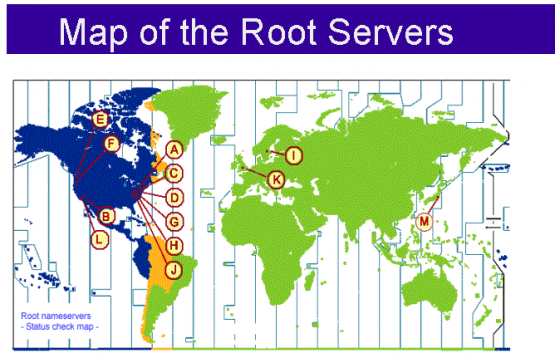
Did you forget about the Root Server request for/confirming existence of the IP Address?
Let's take a gander!
The root server responds with the quick note saying basically "Yes, that site exists and here's the IP Address for the site" using IP protocols
Then your browser software sends a quick note to the server(s) at that IP address saying something like "Hello, I'd like to talk to Mr W's web site. Since I want to talk to your web pages I'd like to use port #80, is that ok?" and then that server responds by saying "Yes, please knock on door #80 since that is the standard door for all web traffic on all web servers everywhere on the interweb" using TCP protocols.
Your browser then sends a note to port 80 on the web server at that IP address saying "Hi, I'd like to see the hypertext information on Mr W's Web site". The web server responds by sending the web page (hypertext) characters for that home page formatted using the appropriate HTTP protocols which is all tucked into the application layer <check this>. Once that data is 'out the door' (port) the server then closes that connection.
Your browser reads all that hypertext inside the application layer. Your browser finds that data is well formatted hypertext markup language and begins constructing the page using your browser software.
Your browser notices there are pictures on the server homepage and sends an additional request to port 80 on the web server at the IP address with a request to send that picture along.
The web server software monitoring port 80 at that IP address then sends that picture back to your browser inside the application layer. Your browser then finishes populating that entire web page by adding the picture into the code at the correct location.
Done!
Right?
No!
YIKES....
As with many things technical on the interweb, there is a lot more to it...
Let's revisit the opening question...
What information MUST be present in a packet?
Think of each packet like a letter you send (don't you?) across the country using the good ol' USPS:
You need a properly formatted address for the recipient:
Frodo Baggins
1234 Bagshot Row
Port Orchard, Wa
98367
And of course you need a well formatted return address containing the same types of data.
═══════════════════════════
Every packet that goes out from your computer to the interweb needs your own personal physical address (more on that later)
It also needs the IP address of your Internet Service Provider.
Why is that?
Let's discuss
═══════════════════════════
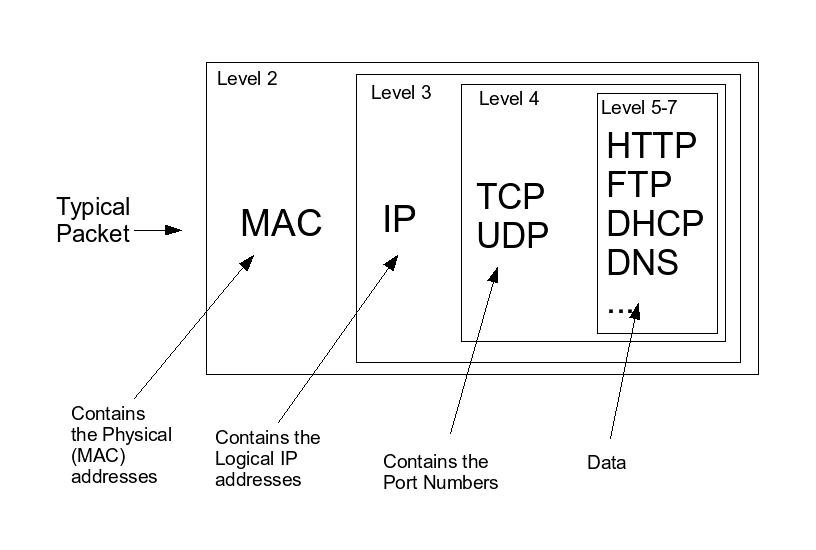
Here's a basic way to look at each packet in 'layers':
The hardware layer
Ethernet Header contains the physical address of the sending AND receiving computer. I believe that it also contains specific technical detail about your network.
The IP layer:
IP Header contains the IP address of the sending AND receiving computer
TCP layer:
The TCP Header contains the port information of the sending AND receiving computers
The application layer:
The application layer contains the data specific to that application such as web page, email, file transfer etc that is determined by the particular protocol for that application.
Close your chromies and grab a sheet of paper.
Without collaborating with your team, please sketch the layers in an Internet Packet for html communication.
Then list out the steps and show how those layers are accessed.
Please collect those and turn them into the sub so I can see how well this is seeping into your grey matter!
If time permits, start doing research into other protocols (There are lots!). It may interest you to know that there are lots and lots and lots of ports (64,000 or so) and lots of those are "reserved" for particular applications.
We'll be working on mapping out how communication occurs using ONE of those protocols so find one that interests you!